
The catalogue gives you the ability to manage your library borrowing and track your reading under the heading My Account.
- Account and privacy settings
- Keeping track of your borrowing and holds
- BiblioCommons Apps
- Share your opinions
- Third party services (Library Elf and Library Extension)
My account
- Log in to BiblioCommons by entering your library card number or username if you have one and password or PIN.
- Once logged in a page displays your checked out items and their return dates.
- You can also access lists of items you have on hold and fines.
Account and privacy settings
BiblioCommons allows you to change several settings for your account:
- The account settings page allows you to change your username, password and preferred pick-up locations for items on hold.
- To change name, address, telephone number, or other personal details, complete our form, or contact us.
- Use the privacy settings page to change who can see items and comments on your shelved items.
Keep track of what you have out and when it is due
- Check the receipt you collect at issue points;
- Phone or email the library;
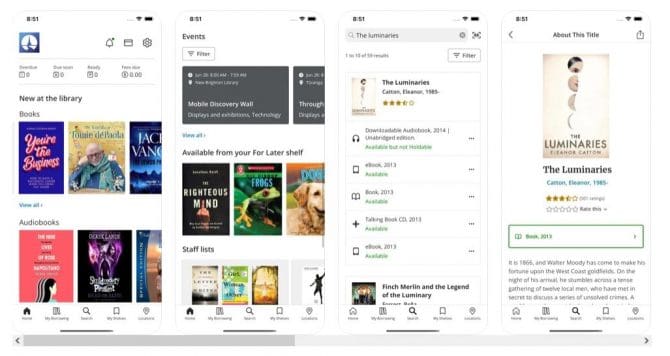
- Access your account online in our catalogue (you can also check with your iPhone or Android device using our BiblioCommons apps).
CCL Mobile - BiblioCommons app
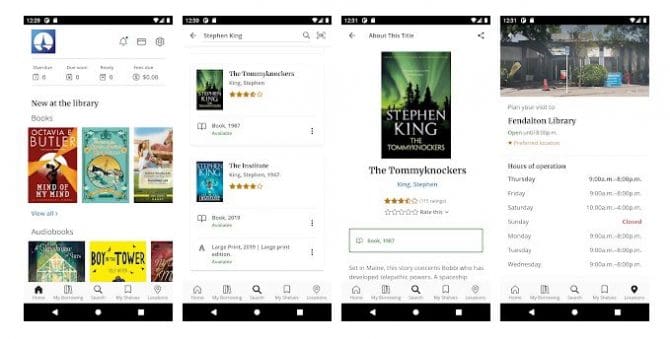
You can use the library app to:
- Search the collection and save titles for later
- Place and manage holds
- Renew checked out items
- View lists of great titles created by your library staff
- Check the opening hours and details of your favourite library locations
If you have joined the library as a new member, you need to create a BiblioCommons account profile before you can login to the app. Please follow the instructions in the Registration email.
Find about the features of the library apps
iPhone
Download Christchurch City Libraries CCL Mobile

Android devices
Download Christchurch City Libraries CCL Mobile.
Share your opinions
Find out how to make the most of our social catalogue.
Using the old catalogue
You can still access our old catalogue.
Third party services
There are a few services that you can use to help you manage your account. Please note that these are not provided by Christchurch City Libraries and may require that you give them access to your account information — if you do so it is at your own risk. We recommend that you read their terms of service carefully so that you understand the service.
Library Elf
Library Elf is a web-based service that you can use to help manage your account, by receiving email and/or RSS alerts before your items are due, and about overdues and holds. Multiple library cards can be tracked by Library Elf, allowing all of your family’s borrowing activity to be summarised into a single consolidated email.
Christchurch City Libraries has subscribed to Library Elf, allowing all borrowers to receive the premium service for free.
Library Elf is a third party service. This means that Christchurch City Libraries is not responsible for any services provided, and we recommend that you read their Terms of Use and Privacy Policy. You will be required to enter your library card number and PIN.
Library Extension
Library Extension is a browser plug in or extension that lets you instantly see book and eBook availability from your local library when browsing book titles on other sites.
Once installed, select Christchurch City Libraries and Library Extension will display holdings information for books when browsing on Amazon, for instance.
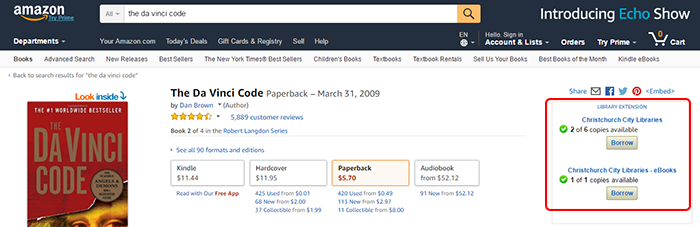
Library Extension works with the following sites -
- Amazon (amazon.com, amazon.co.uk, amazon.ca)
- Barnes and Noble (barnesandnoble.com)
- Good Reads (goodreads.com)
- AR BookFinder (arbookfind.com)
- Google Books (books.google.com, books.google.co.uk)
- BookDepository (bookdepository.com)
- Chapters/Indigo (chapters.indigo.ca)
